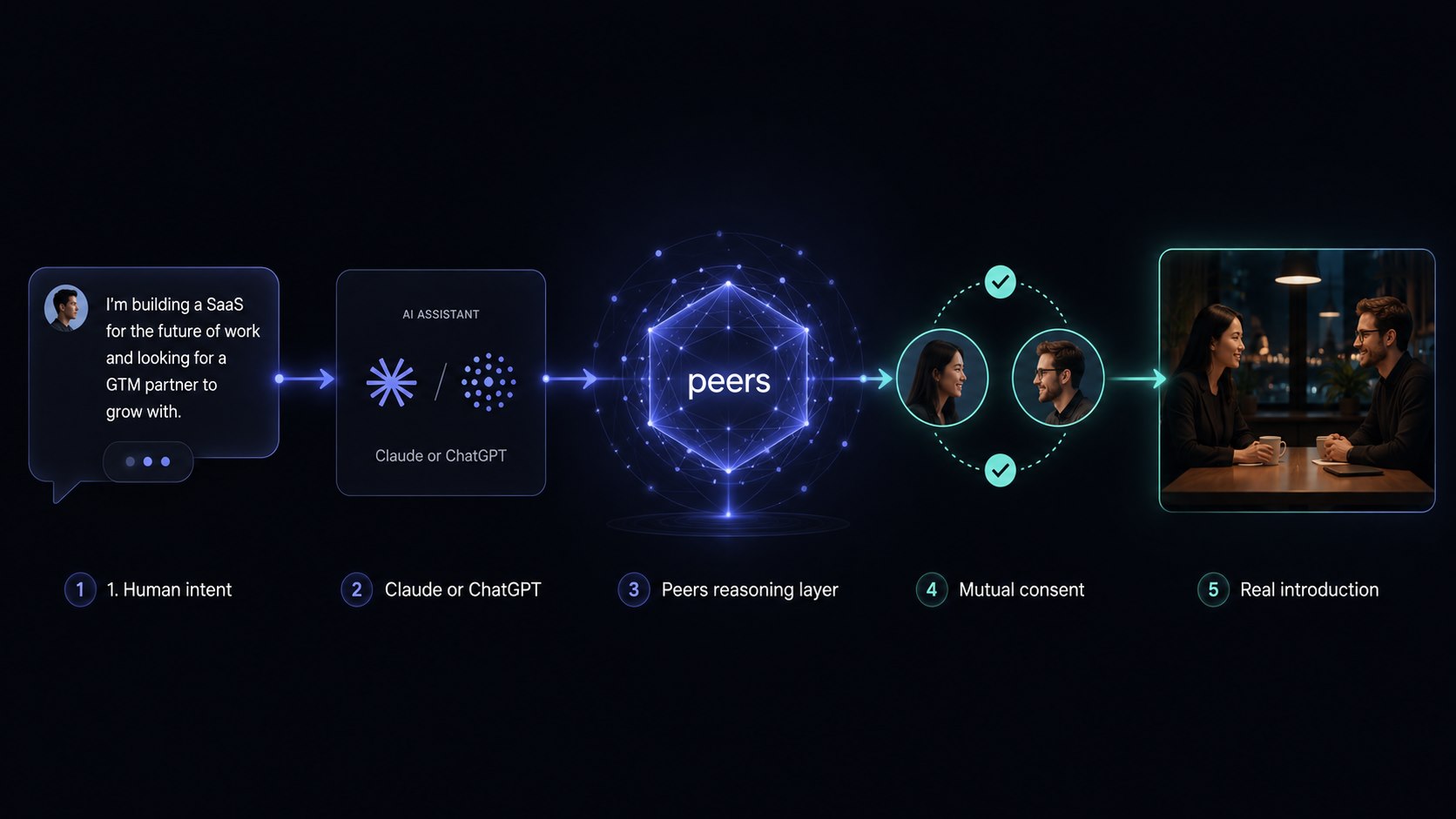
Peers matches the people in your space and auto-delivers introductions to your best matches — you're always in control.
Pick how you drive it — talk to it through your AI assistant, or call the REST API.
Most people connect through Claude and never touch the API.
Human intent → your AI assistant → the Peers reasoning layer → auto-delivered intro → a real introduction.
Overview
A space is any group you want to make introductions within —
an event, a community, a cohort, a network. People join and share what they
need and offer. Peers looks for complementarity, scores candidate
pairs, and auto-introduces your best matches directly — you're always in control
(switch to approve-first or opt out anytime).
Connect — two ways
Both paths reach the same Peers. Start with your assistant; drop to the API only if you're building something custom.
Through your AI assistant
Recommended
1Add https://api.linkpeers.com/mcp to Claude, ChatGPT, Gemini, or Grok.
2Authorize once — your assistant runs the OAuth flow. No keys to paste.
3Just chat: "create a space", "import my guest list", "run matching." Done.
Transport Streamable HTTP · Auth OAuth 2.0 (PKCE)
Call the REST API
For builders
1POST /v1/keys/request — get a one-time code by email.
2POST /v1/keys/exchange — trade it for an mm_sk_ key.
3Call /v1 with an Authorization: Bearer header. Done.
Base https://api.linkpeers.com · read-only keys are GET-only
✳
You don't have to write code. Connect through your assistant and ask in plain language — it calls the tools for you. The tool and endpoint reference below is there when you need the detail.
The flow
However you connect, the lifecycle of a space is the same:
Step 1
Create a space
Ask your assistant to create a space and pick a slug. You become its organizer.
Step 2
Bring people in
Share the join link so people add themselves through their own assistant — or import an existing list from CSV. Importing is optional.
Step 3
Matching runs
Matching runs automatically — hourly, and whenever someone joins or updates their profile. You can also trigger a run on demand. Peers scores complementarity and stages the best pairs.
Step 4
Auto-intros go out
By default, Peers auto-introduces your best matches directly by email — you're always in control (switch to approve-first or opt out anytime).
Organizer tools
For the person who runs the space. MUT marks a tool that changes data (blocked for read-only access).
Question-generation cost: if you do not provide questions, Peers generates them once when the space is created. Owner-authored questions skip that call and stay unchanged when goals change. Switching back to generated questions requires an explicit regenerateIntakeQuestions: true, which queues one generation call.
create_spaceMutCreate a space; optionally provide judge policy and 1–8 custom text questions. Policy guides matching but cannot override member exclusions, consent, privacy, evidence, or mutual value.name, slug, type?, description?, matchingGoals?, matchPolicy?, intakeQuestions?
import_attendeesMutImport attendees from CSV text (needs an email column; name optional).slug, csv
list_participantsList participants with name, email, role, and memory count.slug
get_space_statsAggregate stats plus active policy/version, questions, their source, and generation status.slug
update_spaceMutUpdate goals, judge policy, questions, consent, or intro pace. Goal edits regenerate only generated questions; custom questions are preserved. Use the explicit flag to switch back to generation.slug, matchingGoals?, matchPolicy?, intakeQuestions?, regenerateIntakeQuestions?, consentDefault?, freeIntroLimit?
run_matchingMutTrigger a match run on demand. Matching also runs automatically — hourly, and on new members / profile updates.slug
set_space_boostsMutTurn the anonymized Asks Board on/off for your space, or take a specific boost down. Disabling hides the space's boosts everywhere.slug, enabled?, removeBoostId?
Participant tools
For everyone in a space — including the organizer, who is also a participant.
whoamiReturn the signed-in person's identity, scope, and permission.
list_my_spacesList all spaces the person has joined.
get_spacePublic summary of a space by slug.slug
join_spaceMutJoin a public space (invite-only spaces are rejected). If you were invited with a code, pass referralCode — the person who invited you gets connected to you with a warm intro (and those intros don't count against anyone's weekly/monthly caps).slug, referralCode?, copyFromSlug?
talk_to_matchmakerMutSend a message to the space matchmaker and get the reply — the default way to build your profile; it extracts needs/offers automatically.slug, message
submit_intakeMutSubmit intake tags (instant) and free-text answers (queued for extraction). Answers only work for spaces that have intake questions defined — otherwise the call redirects you to talk_to_matchmaker; tags always work.slug, tags?, answers?
list_my_memoriesList the caller's active memories in a space.slug
remove_memoryMutCorrect one of your own memories (replacement queued for extraction) — or delete it by omitting text.memoryId, text?
find_matchesMutSearch for a current need. With explicit confirmation, saves that need as matchable and expiring, judges a bounded shortlist, and returns private opportunities without sending introductions. New people are preferred; past connections require new evidence and a new reason.slug, need, confirmMatchable, expiresInDays?, maxResults?, includePastConnections?
list_search_opportunitiesList your unexpired explicit-search and reconnect opportunities. Only the member whose need or profile change triggered an opportunity can see it.slug
request_match_introsMutAct on up to 3 selected opportunities. New matches enter the normal consent/delivery flow; a reconnect returns the existing shareable contact and a fresh next step.slug, opportunityIds
set_preferencesMutUpdate your consent mode, discovery breadth, and intro pace. matchStrictness: exploratory (widest — allows specific low-risk inferred matches), balanced (default), or selective (strongest explicit value only) — it changes the judge's evidence threshold, never privacy/consent, and the stricter person governs a pair. Weekly and monthly caps both apply (the tighter one wins), each up to your plan's ceiling. referralIntros: whether people who join with your invite code get auto-connected to you (default on; these don't count toward your caps either way). Optionally add LinkedIn/phone shared only after mutual consent.slug, consentMode?, matchStrictness?, introsPerWeek?, introsPerMonth?, referralIntros?, linkedinUrl?, phone?, sharePhone?
list_my_introsList potential matches with a two-sided reason, score, and status.slug
respond_to_introMutAccept or decline a pending introduction.introId, accept
block_personMutNever be matched with a specific person in this space ("don't match me with X"). Resolves by display name.slug, name
unblock_personMutUndo a previous block — allow this person to be matched with you again.slug, name
recommend_spacesDiscover other listed spaces whose members fit your needs and offers, ranked by fit.limit?
get_share_kitGet everything to invite others — a personal referral link, the space's value angles, and your referral count.slug
preview_boostMutTurn one of your asks into an anonymized, shareable post — drafts it but publishes nothing. Strips your name, employer, and contact details, generalizes the ask so it can't single you out, then returns a LinkedIn post, an X post, and (by default) a line for the public Asks Board, with a boostId to approve. Opt-in; sensitive topics need sensitiveAck.slug, sourceMemoryId?, sensitiveAck?, mode?
publish_boostMutPublish a boost draft you already reviewed, by its boostId — this only flips that exact draft live; it never accepts new text, so nothing you haven't seen can go out.boostId
list_my_boostsList your Ask Boost drafts and published posts (id, status, the anonymized text).slug?
unpublish_boostMutTake one of your boosts down from the Asks Board.boostId
give_feedbackMutRecord feedback about the experience or a specific intro.slug, introId?, useful?, met?, rating?, note?…
get_pending_checkinsList spaces the user should be proactively checked in on.
leave_spaceMutStop participating in a space — pending intros are cancelled and your profile stops being matched. Your data is kept unless you also delete it.slug
delete_my_dataMutErase your data — one space or everywhere. Immediate soft-delete, then a permanent purge after 30 days.scope (space|all), slug?
revoke_my_agent_accessMutRevoke all agent (MCP) access tokens you've granted.
REST API — authentication
Every request carries an API key in the Authorization header. Create one by
requesting a one-time code by email, then exchanging it. Read-only keys are rejected on any
write (non-GET) request. Paths are versioned under /v1.
# 1. Request a one-time codePOST /v1/keys/request
{"email": "you@example.com"}# 2. Exchange the emailed code for a keyPOST /v1/keys/exchange
{"email": "you@example.com", "code": "1234", "name": "my-app"}→ { "apiKey": "mm_sk_…", "keyPrefix": "mm_sk_…", "permissionLevel": "read_write" }# 3. Use it on every requestAuthorization: Bearer mm_sk_…
Spaces
matchPolicy accepts objective, mustHave[],
prefer[], avoid[], and organizerReview[].
Matching configuration is private to the organizer.
POST/v1/spacesCreate a space; optional matchPolicy and intakeQuestions. Returns joinUrl and configuration state.
GET/v1/spaces/:slugPublic space summary. No auth. 404 for private spaces.
GET/v1/spaces/:slug/configRead policy/version and questionnaire state (organizer only).
PATCH/v1/spaces/:slugUpdate goals, policy, or questions; use regenerateIntakeQuestions: true for one generation job (organizer only).
POST/v1/spaces/:slug/joinSelf-join a public space.
POST/v1/spaces/:slug/chatMessage the space matchmaker. Body: { message }. Returns { reply, done }.
GET/v1/spaces/:slug/me/memoriesList your own active memories in a space.
DEL/v1/memories/:idSoft-delete one of your own memories.
Import
Import a CSV directly, or presign an S3 upload for larger files.
POST/v1/spaces/:spaceId/importUpload a CSV (multipart file, ≤10MB). Enqueues an import job.
POST/v1/spaces/:spaceId/import/recordsImport enriched records as JSON (Pro; ≤500/call). Body: { records[], attestPermission }.
POST/v1/spaces/:spaceId/import/presignGet a presigned S3 PUT URL. Body: { filename }.
POST/v1/spaces/:spaceId/import/completeMark a presigned upload complete and enqueue import. Body: { storageKey }.
GET/v1/spaces/:spaceId/import/:batchIdImport batch status, row counts, and errors.
Introductions
Consent and feedback are token-authenticated links delivered by email — no API key needed. They render a confirmation page and are idempotent.
GET/i/:introId/:side/:actionAccept or decline an intro from an email link. side a|b, action accept|decline, signed ?t=.
GET/f/:introId/:side/:verdictThumbs up/down on a delivered intro. verdict up|down, signed ?t=.
Keys & sign-in
POST/v1/keys/requestEmail a one-time code to create an API key.
POST/v1/keys/exchangeExchange the code for a new mm_sk_ key.
POST/v1/auth/magic-linkRequest a magic sign-in link by email.
POST/v1/auth/verifyVerify a magic-link token and start a session.
GET/v1/auth/meThe currently signed-in person.
◆
MCP clients don't use API keys. The /mcp endpoint authenticates
over OAuth 2.0 (PKCE), which your assistant negotiates automatically. API keys are only for direct REST calls.